
Aphex changelog
v4.6.0
New
Planner
Idle Seats - Idle Seats helps Org Admins identify unused Planner and Diary seats in the Org Users tables. Seats are flagged as ‘Idle’ in the Org user table if they have a Seat toggled on, but are not added to any active projects.
Mobile
Production Measures - View, assign and edit Production directly from task properties on mobile. You can also add Production as an overlay on Task List cards.
Diary
Routines - Admins can now define when a Diary is expected using either a custom weekly routine or the Project Calendar, so Diary creation better reflects how the Project operates.
Auto-close - Choose to automatically close open Diaries after 7 days, reducing the need to manually manage older Diary entries.
Improvements
Planner
Planner PDF Print - Printing Gantt Views is now faster and more reliable for large plans, with automatic zoom level adjustment to keep timelines readable.
Publishing - Publishing large plans is now faster and more reliable with reduced timeout risk.
Password Reset - Users can now reset their password directly from Account Settings via email confirmation, with automatic sign-out across all sessions
Bug Fixes
Planner
Map View
Map View prints show an extra day when sequence enabled
Progress modal not opening up on the correct date on Map View
Clashes
When marking clash as non-conflicting, confirmation modal persists after ticking 'Do not ask me again'
Resources
Edits to Resources in Gantt Table aren't reciprocated in right-hand panel
Production
Production Breakdown – Original start date remains after task is moved and duration extended
Progress Updates
Thumbs-up "on schedule" progress shows red / low production output on unit-based production measures
General
French Translation: Timezone Library
Import CSVs failing
Task list discrepancy between web and mobile
Rate limiting when updating tasks with multiple links
Shift-select doesn't select the rows in between in the Views page in project settings
Diary
Labour and Plant entry fields in Diary edit state and failed saves
v4.5.0
New
Diary
Project Level Toggle - Admins in entitled Enterprise organisations can turn Diary access on/off per project, controlling whether that project can allocate Diary Seats and use Diary.
Improvements
Diary
Copy-From-Day Calendar Content - When opening the Copy from Previous Day calendar from within the labour or plant contribution flow, the calendar reflects the availability of that content type across historical dates.
Add MCP to web - The MCP Connector lets organisations connect their Aphex project data to external AI tools via the Model Context Protocol. The feature introduces an "AI" page in both the Org Admin console and Project Settings. It will be available based on your subscription plan, with system or super admins able to turn it on or off for the whole organisation.
Bug Fixes
Planner
Reminder to Publish emails sending incorrect Due Date
Logic link lag is being created incorrectly within links between tasks of different calendars when links span non-working days for the successor task
XER file unable to be selected for import
Hidden text Map layer markups revealing when clicking their location (despite being hidden)
Asset paste fails for any asset with 2+ commas in its name
Filtered dates tooltip shows raw string instead of the resolved value
Existing task's duration is not extended/updated when updating calendar non-working days
Delete view is not working from overflow menu
French Translation:
Map view > Loading Layers
Gantt > Baseline Column
Project assets > Calendar > Create
Project assets > Labour > Archive Labour
Project assets > Labour > Type Column
Print view > Print Config
Print view > PDF Footer
Diary
Site Diary - Formatting in Summary reverting
v.4.4.0
New
Blockers and Tags added to Plan API
Improvements
External ID filter for Is Empty and Is Not Empty
Adjustments to French translation
Bug Fixes
Planner
Improvements to Promised tasks no longer cause notifications for all Planned successors
Propellor map layers auto-refresh once new sublayers are available
Drone Deploy layers auto-refresh once new sublayers are available
Sensat map layers auto-refresh once new sublayers are available
Task bar no longer scrolls to end of View tabs after selecting first View
CTRL + D keyboard shortcut successfully duplicates tasks
Relationship links no longer reverse link type on being drawn between tasks
Dragging a Milestone no longer displays a duplicate partial Milestone at the top of Gantt view
Target date variance shows on Gantt Year view
Open Views remain consistent when projects are closed and reopened
Diary
Unplanned tasks return to the Task list when an archived Entry is restored
Entry history consistent across Web and Mobile
Confirmation required when Archiving Diaries
Able to successfully unlink task-linked Notes and Images via the Inspect panel
Creating Entries from Notes correctly maps Shift
Clicking image or note from Entry history log opens side panel in front of history log
Photos added via camera on mobile show a thumbnail on both Notes & Images list and Diary preview
Clipboard image file names truncate in the Inspect panel
Notes added via Progress Updates reflected towards Notes & Images count
Calendar date selector no longer allows selection of closed Entry dates when attaching Notes and Images
v4.1.0
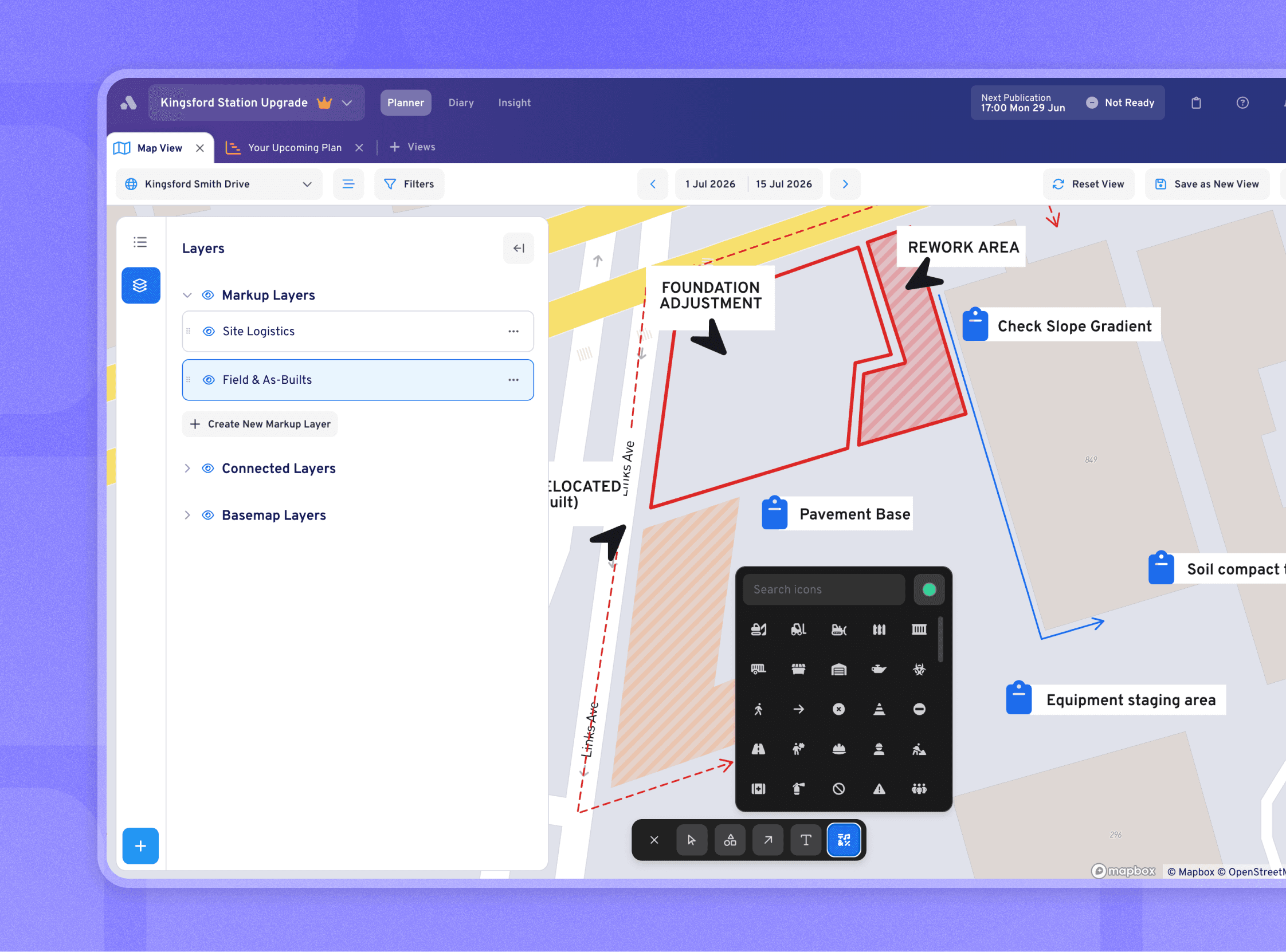
New
Map Markups & Markup Layers - Teams can now draw and annotate directly on the map (shapes, arrows, text, icons) to flag risks, sketch ideas, or add context (Pro+ only)
Production Measures (Phase 1) - A new way to plan measurable output on a project, like ‘Concrete Poured’ or ‘Panels Installed’, and set a target rate to plan against
French Localisation - Aphex now supports French, with users able to set their own display language across all of Aphex, and projects able to set a language for its built-in defaults (things like Delay Reasons, Default Calendars and Shift names)
Improvements
Diary States - Compiling a diary no longer changes its status, instead generating a timestamped summary while the diary remains open for further updates. Reopening a locked diary now requires an authorised role (e.g. an admin) and is recorded in the diary history.
Bug Fixes
Planner
Clash filter incorrectly applying project look-ahead period instead of view date range
Promised Tasks on Gantt not changing appearance
Personal View Config is resetting on View Change or Refresh
Map - multiple overlapping work areas pop-out cut-off screen
Clicking ‘View Publication Summary’ from the planner bar Recent Publications overflow menu does nothing
Lookahead line shows differently on live project vs PDF
Inconsistent Board View ordering, groupings/options reset after navigating to different view
Right-click property menu stays open over dialog when opening Blocker / Add User / Calendar pickers on Gantt
Undo shortcut doesn't revert assignee changes on Board view
Board View Print PDF shows incorrect dates
Publication CSV exports include duplicate tasks when exported from the Next Publication card > Recent Publications > Overflow menu
Inconsistent slide out behaviour for RHP in Gantt view
Improvements to pop up space requirements on map
Default View Tabs not Visible when Opening new Project
Saved Column configs are not present after refresh
Duplicate option missing from right-click menu on parent tasks in Your Upcoming Plan
Tasks with Packages assigned grouped as 'No Package Assigned'
No tooltip on clashing tasks icon in FAB
Long calendar name reveals full text on click in read-only calendar cell, breaking truncation
Folder duration column displays NaN when folder has no tasks in current view definition
Map RHP: task modal opens in board/list view after switching from map
Account Settings > Save Changes button stays visible after a successful save
Diary
Opening diary entry hits "unexpected error" message
Suggested Tasks blank in CA & EU Projects
v3.20.0
New
Planner
Assigning Work Areas on the Map - Assign and edit work areas directly in Map View, with drawing tools and task creation now fully integrated into the map experience
Bulk Clash Resolutions and Improved Clash Workflows - New Clash Management workflow introduces structured resolution flows across both Gantt and Map View, including Clashes, Non-Conflicting, and For Review states
Diary
Labour & Plant - You can now add Labour & Plant actuals to a diary entry
Improvements
Planner
Baseline Start and End Property - Baseline start and finish dates are now surfaced directly in Board, List, and Gantt views
Diary
Diary States - Updates to existing diary states where closed diaries are now 'Reviewed', and 'Compiled' is a new state
Bug Fixes
Planner
Fixed delay when opening the Folders filter dropdown
Fixed inability to scroll in Baselines dropdown tray
Publishing
Fixed users appears as 'not ready' in publishing table despite no tasks in lookahead period
Board
Daily compliance section no longer breaks sticky group header behaviour
Map
Fixed Map Sub-Layers redirection to incorrect Geographic Location
Fixed inconsistent behaviour for layers governed by custom selection
v3.19.0
New
Multiple Weeks on Board
View 1–4 weeks at once on the Board, allowing you to plan and coordinate work beyond a single week
Keep task positions, grouping, and layout consistent across weeks so work is easy to follow over time
Quickly zoom in and out between a detailed 1-week view and a broader multi-week view
Navigate time easily with a week selector, custom week start, and “Today” shortcut
Supports real-world planning workflows by mirroring how teams lay out and review work across multiple weeks
Daily Status Compliance
Daily compliance visibility surfaces how well teams are keeping tasks updated across Board and List views, reinforcing daily statusing discipline
Real-time compliance metrics show task status distribution (On Schedule, Delayed, Missing Update) based on current filters and view
One-click highlighting of missing updates makes it easy to identify and act on tasks that require attention
User-controlled visibility allows individuals to toggle the feature on/off within View Options menu without disrupting team workflows
Improvements
Diary Code Quality
Fixed permission gaps to ensure all diary pages correctly enforce user access controls
Improved error handling so users and integrations receive clear, actionable error messages
Improved input validation to prevent crashes from unexpected or edge-case data
Replaced outdated and upgraded core dependencies to the latest versions to improve stability and security
Bug Fixes
Planner
Filters
Task Status filter options no longer appear disabled
Project Settings
Legacy org-level suspensions now reflected at project level
View now correctly navigates to new location after moving folders via the Assets page
Gantt
Fixed clashes appearing in Publications but not being visible in Gantt or side panel
Corrected a delay logging issue impacting task duration
“Grouping” button now opens grouping tray when Gantt is empty
Fixed incorrect row selection when duplicating parent tasks
Printing
Print Board: milestone vertical line no longer cut off at page end
Importing
“Apply to all tasks” blocker logic now includes imported (CSV and Master Schedule) tasks
Diary
Fixed summary compilation issue on mobile
Note corners now render correctly
Shift selection dropdown no longer reverts when changed quickly
Seat numbers now showing correctly in the Admin App
v3.18.0
Bug Fixes
Diary
Diary entries now saving correctly when editing existing entries
Contributor avatars now display properly
Entry summaries display complete text without cutting off the first word
Planner
User role changes now update immediately across the Users table
Search in Users table maintains correct selection state
Added safeguard to prevent accidental removal of the last project admin
v3.17.0
New
Project Permissions for Master Schedule Import
Members can now be granted a specific permission to perform imports regardless of their Planner Access level
Permission settings managed through the new User Panel and Table or applied in bulk from the Users Table
The additional permission is indicated by a permissions icon within the User Table
Bug Fixes
Planner
Filters
Folder filters were incorrectly hiding non-matching folders when filtering by Folder and other properties
All Select Filter dropdowns were opening when the filter modal was closed and reopened
Gantt
Task bars were disappearing when dragging tasks offscreen
Lag was not syncing after automatic scheduling, causing links to stop driving tasks
Maps
WMTS upload was failing when
GetCapabilitiesreturned a single<Layer>Aerial imagery ordering was reversed for Propeller and Civillo sources
Task card preview popover was appearing behind the left panel instead of respecting the viewport boundary
Importing
Folder order in Board view was different from the Folders assets page
Copying tasks to another project was failing when externalId was missing
Folder import via copy/paste was truncating Folder codes
Printing the same view twice was producing differently ordered PDF outputs
Top row dates and task arrows were disappearing when scrolling with Multiple Columns enabled
Right click was incorrectly enabled on the Latest Comment property in Gantt cells
Dropdown from overflow menu was closing immediately when flipping to the left
Spotlight task popup card spacing and corner radius were not matching design
Dropdowns in RHP > Overflow menu were not showing expected width on load
Text in layers pulled from Civillo was not resizing when zooming out
Diary
Diary
Weather image was not showing on diary entries
Organisation logo was appearing instead of project logo on diary entry exports
Authentication
Signing up without an organisation membership was returning a 500 error
MFA status was not appearing in the Admin authentication column