
Aphex changelog
v4.8.0
New
Planner
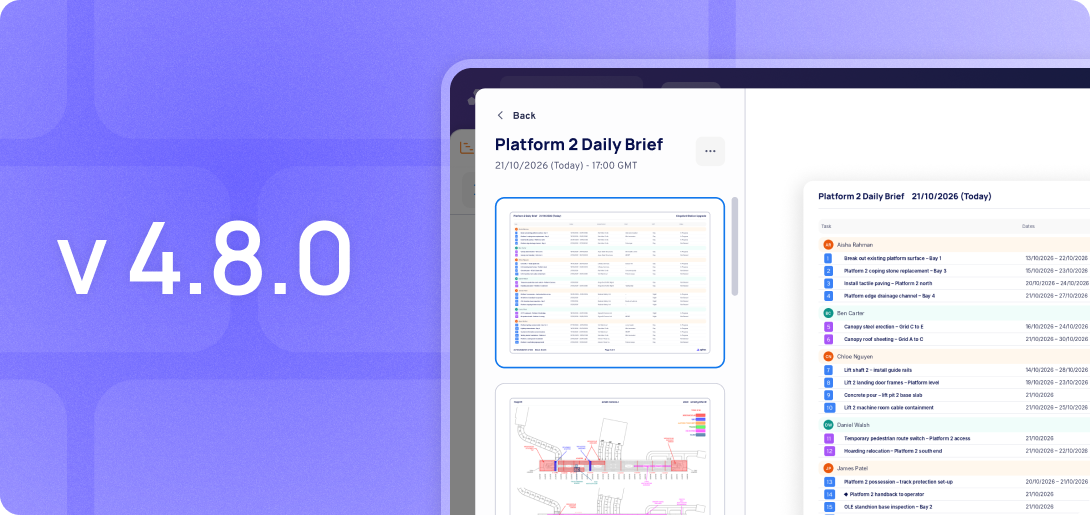
Publish Daily Briefings
Publish a Daily Brief straight from the live plan. Build a template once, then publish each day to generate a printable PDF with that day’s tasks and site plan.
Combine Location sections and Task Table sections in any order.
Every published Brief is saved, giving you a dated record of what was briefed each day.
Find it in Project Assets > Planner.
Admin
Seat Apportionment
Admins can now download PDFs that break a monthly Planner or Diary invoice down by project (and Business Unit), showing each project’s seat share and the people behind it.
Download from the invoice row in Subscriptions & Billing.
The Billed Seats Record CSV now includes a project External ID column.
Improvements
Planner
Track % Complete by Default
Tasks without a production measure can now track percentage complete, with Behind Pace and At Risk working on every task, no setup needed.
Tasks with an existing measure are unaffected.
Project Admins can switch back in Project Settings > Tasks without a Production Measure > Track End Date.
Map Markups
Crane and Barge icons are now available in the Markup Library.
Diary
Plant & Labour Validation
Mandatory fields in the Plant and Labour steps now show clear validation and error messages, so entries can’t be saved incomplete.
APIs
Plan API, PowerBI & Work Area API
Tasks without a production measure now return their percentage-complete progress, in line with the new default tracking.
AI
MCP Connector: Plan Access
The MCP Connector now reads your plan as well as your diary. Ask Claude, ChatGPT or Copilot about your tasks, what moved, who moved it, what it affected and how it compares with a published plan.
Answers can draw on the plan and diary together, for example: “What did the delays in last week’s diaries do to the programme?”
Still read-only, and users only see what they can already see in Aphex. Available to all organisations with the MCP Connector, with nothing new to switch on.
AI Multi-Region Support
Routing the AI processing for the UK & Europe projects to EU (from global).
Bug Fixes
Planner
End date showing as a date before the start date in columns
Production Quantity not auto-averaging
Production Measures breaking when copying tasks into the same project multiple times
Production measure carried percentage dropping after switching to None
Unable to delete or remove saved column groups
Map date range menu closing when clicking the < or > arrows
Activity log not showing the source task when a delay is inherited through a ripple delay
Task CSV export showing distorted characters when opened in Excel
Diary
Diary side panel not opening when clicking the grey update bar on tasks with one entry
Labour line items missing from Diary entry exports
Unable to restore a specific earlier version of a Diary entry
Removed the redundant “View All Diary” button next to Create New Entry on the home page